For the complete documentation index, see llms.txt. Markdown versions of all docs pages are available by appending .md to any docs URL.
Prometheus
Scrape agentgateway metrics with Prometheus.
Prometheus is an open-source monitoring system that scrapes and stores time-series metrics. It is the standard way to collect and query agentgateway metrics, and is the data source behind the Grafana dashboard. Prometheus is well-suited for agentgateway because it efficiently handles high-cardinality label sets, such as per-route, per-model, and per-provider breakdowns. Its query language (PromQL) makes it easy to build alerts and dashboards from those labels.
Agentgateway is built to work with Prometheus out of the box:
- It exposes a
/metricsendpoint on port15020in the OpenMetrics format, which Prometheus can scrape directly. - All metrics use the
agentgateway_prefix and carry consistent route identifier labels so you can filter and aggregate by gateway, listener, and route without additional configuration. - On Kubernetes, the agentgateway chart annotates proxy pods with
prometheus.io/scrape: "true"andprometheus.io/port: "15020"for Prometheus installs that use annotation-based discovery, and ships an optionalPodMonitorfor installs that run the Prometheus Operator.
Set up Prometheus
Set up a Prometheus instance and use PromQL queries to query them. The steps to set up Prometheus vary depending on the way you installed agentgateway.
Create a Prometheus configuration file that scrapes agentgateway.
cat > prometheus.yml <<EOF
scrape_configs:
  - job_name: agentgateway
    static_configs:
      - targets:
          - host.docker.internal:15020
    scrape_interval: 15s
EOF
Run Prometheus with Docker.
docker run -d --name prometheus \
  -p 9090:9090 \
  -v $(pwd)/prometheus.yml:/etc/prometheus/prometheus.yml \
  prom/prometheus:latest
Open the Prometheus UI at http://localhost:9090.
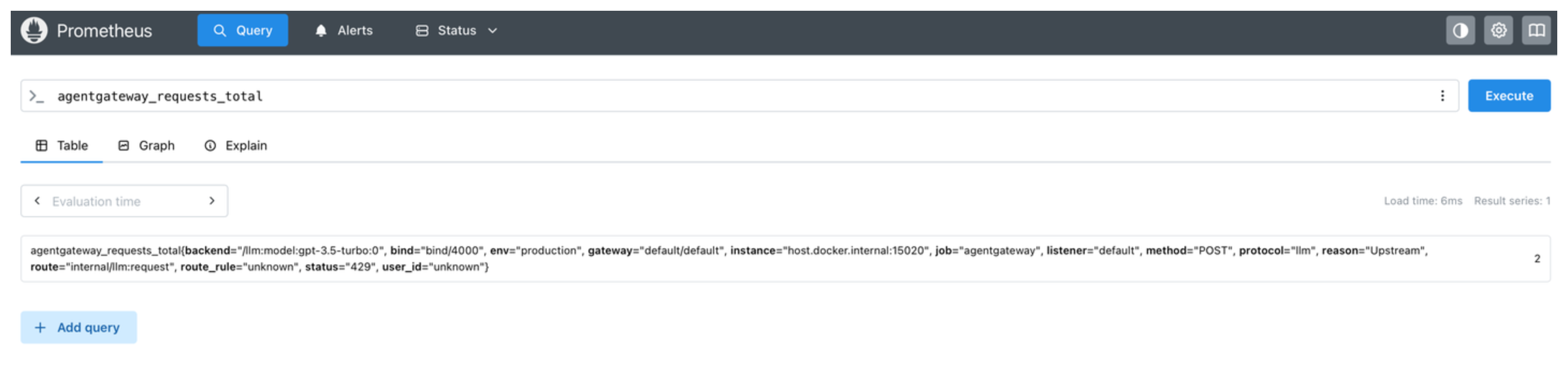
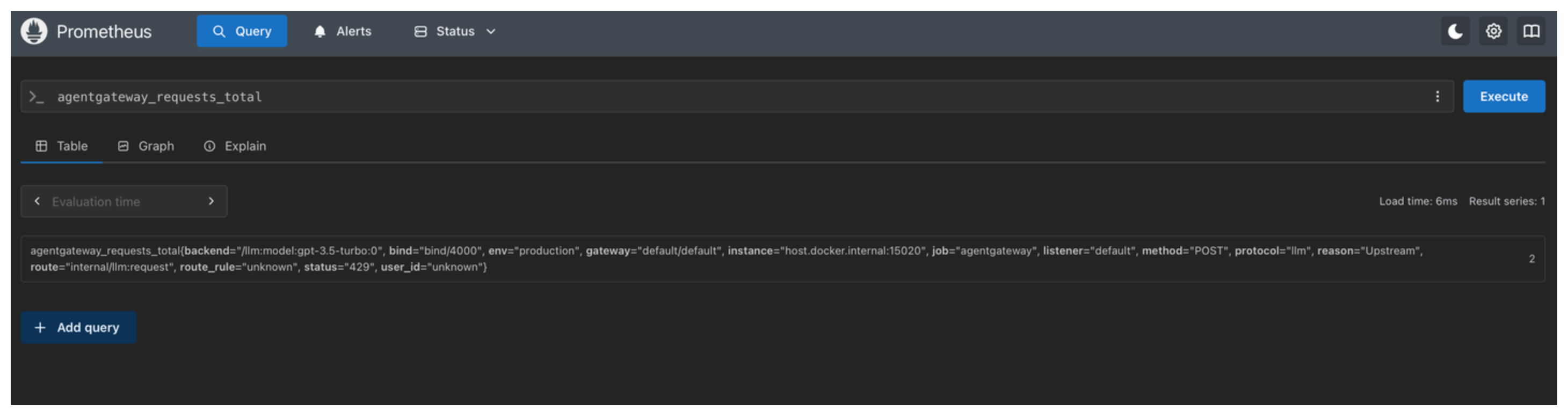
Run a PromQL query to verify that agentgateway metrics are being scraped. In the Prometheus UI, enter the following query and click Execute.
agentgateway_requests_totalThe result shows the total number of requests that are handled by agentgateway, broken down by gateway, listener, route, and status.
When you are done, remove the Prometheus container.
docker rm -f prometheus
Relabel scraped metrics
Add Prometheus Operator relabeling rules to the PodMonitor that the standalone Helm chart creates. The chart supports two kinds of rules:
relabelingsapply to the scrape target before Prometheus scrapes it, such as to change the labels that come from the pod.metricRelabelingsapply to each scraped metric before Prometheus stores it, such as to drop a metric or a label.
To stop the proxy from exposing a metric at all, use the metrics.remove setting instead. Use metricRelabelings when the metric must stay on the metrics endpoint, such as for another scraper, but one Prometheus instance does not need it.
Save the relabeling rules in a values file. The following example drops the
agentgateway_upstream_call_duration_secondshistogram before Prometheus stores it.cat <<'EOF' > relabel-values.yaml monitoring: enabled: true podMonitor: metricRelabelings: - sourceLabels: [__name__] regex: agentgateway_upstream_call_duration_seconds.* action: drop EOFValue Description monitoring.podMonitor.relabelingsA list of Prometheus Operator relabeling rules that apply to the proxy target before it is scraped. monitoring.podMonitor.metricRelabelingsA list of Prometheus Operator relabeling rules that apply to the scraped proxy metrics before they are stored. Upgrade the Helm release with the relabeling values.
helm upgrade agentgateway-standalone \
  oci://cr.agentgateway.dev/charts/agentgateway-standalone \
  --namespace agentgateway-system \
  --version 0.0.0-latest-dev \
  --reuse-values \
  -f relabel-values.yaml
After the next scrape, verify in the Prometheus UI that the following query returns no new data.
agentgateway_upstream_call_duration_seconds_count
Native and classic histograms
Duration and size metrics, such as agentgateway_request_duration_seconds and agentgateway_gen_ai_client_token_usage, are Prometheus histograms, which count observations in buckets. Prometheus supports two kinds of histograms:
- Classic histograms use a fixed set of bucket boundaries. Each bucket is its own time series with a
_bucketsuffix and anlelabel, next to_sumand_countseries. The proxy emits classic histograms by default. - Native histograms choose exponential bucket boundaries automatically and store all buckets in one time series. They give higher-resolution percentiles, usually at a lower storage cost. They are exposed only through the Prometheus protobuf format.
The proxy can emit classic histograms, native histograms, or both. Emitting both lets you move dashboards and alerts to native histograms gradually. The pre-built Grafana dashboard calculates percentiles from the classic _bucket series, so keep classic histograms while you use it.
Scrape native histograms
To get higher-resolution percentiles in Prometheus, make the proxy emit native histograms, and make the PodMonitor that the standalone Helm chart creates scrape them. Both settings are off by default.
Before you begin, make sure that you have the following:
- agentgateway installed with the standalone Helm chart, and the PodMonitor enabled as described in Set up Prometheus.
- Prometheus v3.8.0 or later.
- Prometheus Operator v0.88.0 or later, which adds the
scrapeNativeHistogramsfield to the PodMonitor CRD.
Save the histogram settings in a values file.
cat <<'EOF' > histogram-values.yaml
config:
  config:
    histograms: both
monitoring:
  enabled: true
  podMonitor:
    scrapeNativeHistograms: true
    scrapeClassicHistograms: true
EOF
Value Description config.config.histogramsThe histograms that the proxy emits: classic,native, orboth. The default value isclassic. The example usesbothso that the pre-built Grafana dashboard keeps working.monitoring.podMonitor.scrapeNativeHistogramsScrapes native histograms. When set to true, the chart addsPrometheusPrototo the PodMonitor scrape protocols. The default value isfalse.monitoring.podMonitor.scrapeClassicHistogramsScrapes classic histograms. The default value is true.Upgrade the Helm release with the histogram values. The proxy reads
config.histogramsonly at startup, so the upgrade restarts the proxy pods.helm upgrade agentgateway-standalone \ oci://cr.agentgateway.dev/charts/agentgateway-standalone \ --namespace agentgateway-system \ --version 0.0.0-latest-dev \ --reuse-values \ -f histogram-values.yamlVerify that the PodMonitor scrapes native histograms. In the output,
scrapeNativeHistogramsistrue, and thescrapeProtocolslist starts withPrometheusProto.kubectl get podmonitor -n agentgateway-system -o yamlSend a few requests through agentgateway. Then, in the Prometheus UI, run the following query. The query uses the metric name without the
_bucketsuffix, so it returns a result only when Prometheus stores a native histogram.histogram_quantile(0.95, sum(rate(agentgateway_request_duration_seconds[5m])))
Other configurations
Review other common Prometheus configurations.
Docker Compose
To run agentgateway, Prometheus, and Grafana together as a single stack, use Docker Compose instead of individual containers.
services:
  agentgateway:
    image: cr.agentgateway.dev/agentgateway:latest
    ports:
      - "3000:3000"
      - "15020:15020"
    volumes:
      - ./config.yaml:/config.yaml:ro
    command: ["-f", "/config.yaml"]

  prometheus:
    image: prom/prometheus:latest
    ports:
      - "9090:9090"
    volumes:
      - ./prometheus.yml:/etc/prometheus/prometheus.yml

  grafana:
    image: grafana/grafana:latest
    ports:
      - "3001:3000"
    environment:
      - GF_SECURITY_ADMIN_PASSWORD=admin
    volumes:
      - grafana-data:/var/lib/grafana

volumes:
  grafana-data: